Cute Mermaid Coloring Pages for Kids
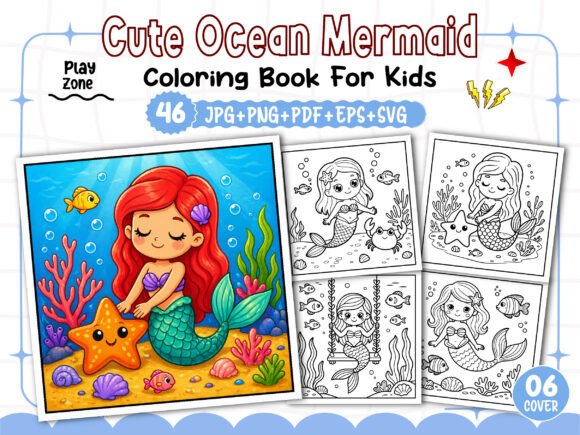
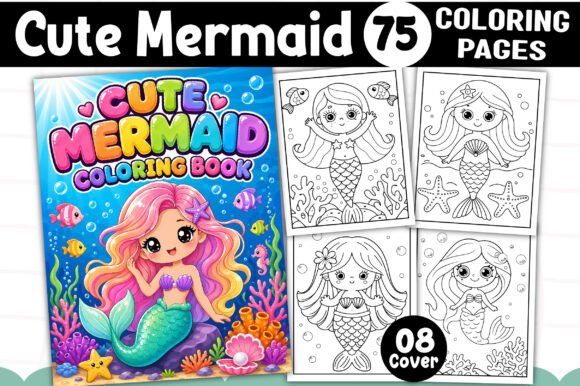
If you’re looking to create a unique, stand-alone product for your self-publishing business, a set of Cute Mermaid Coloring Pages for Kids can be the versatile foundation you need. This collection offers 75 black‑and‑white designs in a print‑ready 8.5” x 11” format, available as PDF, PNG, JPG, SVG, and EPS files at 300 DPI. You also receive 12 PNG book cover templates. Whether you are publishing on Amazon KDP, selling digital downloads on Etsy, or building a library of printable activities, these high‑resolution pages are designed to save you hours of preparation while giving you full creative control.
What Makes This Mermaid Coloring Collection Stand Out
The first thing you notice is the consistent “cute” style — gentle lines, friendly expressions, and simple yet engaging shapes that appeal to young children. Every illustration is entirely separate, letting you arrange them in any order or combine them with other content. Because the files come in vector (SVG, EPS) and raster (PNG, JPG) formats, you can resize elements without losing quality, tweak line thickness for different age groups, or add color accents if you want a hybrid coloring book. The 300 DPI resolution ensures crisp prints even on large trim sizes, and the black‑and‑white line art prints cleanly on standard paper without heavy ink consumption.
For a busy creator, these details translate into real time savings. Instead of commissioning illustrations or cleaning up scanned sketches, you can focus on layout, theme integration, and marketing. And because the collection includes a ready‑to‑use PDF and EPS file, you can jump straight to printing or upload your book interior with minimal extra work.
Creative Applications for Your KDP Interior
A coloring book built around mermaids naturally fits an under‑the‑sea theme, but you can adapt these pages in several ways to reach different audiences:
- Standalone coloring book: Use all 75 pages as a dedicated mermaid activity book. Add a cover from the included PNG templates, write a short introduction or a page for the child’s name, and you have a complete interior ready for KDP.
- Themed bundles: Combine mermaid pages with related designs — ocean creatures, seashells, castles — to create a larger activity book. Because each file is separate, you can easily mix and match.
- Activity pad inserts: For a spiral‑bound pad or a tear‑off calendar, convert selected pages into PNG or JPG and insert them into a template. The high resolution keeps lines sharp even after resizing.
- Digital products: Sell individual pages as printable rewards on Etsy or as content upgrades for blog posts about ocean‑themed crafts. The SVG and EPS formats also allow you to turn a design into a sticker or an embroidery pattern.
For teachers and homeschoolers, a mermaid coloring book can serve as a quiet‑time activity that reinforces fine motor skills. You could lightly edit the EPS file to add a border or a label with “Name: _____” without needing complex software.
Adapting the Designs for Different Audiences
Although the pages are made for kids, you can adjust them for varying skill levels and contexts:
- Preschoolers (ages 3–5): Keep the line art as is — the simple shapes and thick lines are easy to color inside. Print on heavier paper to avoid bleed‑through with markers.
- Older children (ages 6–9): Add small details like dots or scales using the SVG format. You can enlarge certain elements to create a more complex composition that holds their attention longer.
- Bilingual or multilingual books: Insert text in another language above or below the image (e.g., “Sirena” for Spanish). The EPS file makes it straightforward to add text layers.
- Coloring competition sheets: Use the JPGs as base images for local library events or birthday party activities. Print on 11” x 17” paper if you want a larger format.
If you are targeting a slightly older audience such as tweens, you can modify the style by adding background elements — waves, seaweed, bubbles — using the vector files. This turns a simple coloring sheet into a more detailed scene without losing the friendly mermaid core.
Tips for Keeping Your Coloring Book Organized and Consistent
When you work with a large set of loose files, a little structure goes a long way. Here are practical steps to maintain quality and consistency:
- Number every page: Rename the files in order (page_01.svg, page_02.svg) so you never lose track during layout. This also helps with the table of contents if you add one.
- Set a single line‑weight standard: Open the EPS in vector software (Adobe Illustrator, Inkscape) and verify that all strokes are the same thickness (e.g., 2‑3 pt). If any page has thinner lines, adjust it before exporting the final PDF.
- Use the same trim and bleed: Convert the pages to a single document with 8.5” x 11” trim and .125” bleed. Most KDP tools require this format, and keeping them uniform avoids shifting images.
- Test print one copy: Print a few pages on your home printer to see how the line art looks on plain copy paper. Black lines should be crisp and not too faint. If needed, raise the stroke weight slightly in the EPS.
- Create a consistent cover: The 12 free PNG book covers give you a head start. Match the cover style to the interior mood — bright colors for preschool, pastel tones for a calm activity book.
Consistency is especially important if you plan to sell through Amazon KDP. A cohesive interior — same line size, same paper color, same layout margins — makes your book look professional and reduces customer returns.
Making Your Unique Interior with the Provided Formats
One of the strongest advantages of this collection is the multiple formats included. Here’s how each can be used:
- PDF (print ready): This is your zero‑effort interior. Just open it, add a cover, and upload to KDP. It already has page sizing and layout set.
- PNG (transparent background): Perfect for layering onto other designs, creating social media previews, or making digital stickers. The transparent background lets you place each mermaid on any color or pattern.
- JPG (white background): Use for quick printing or previewing. No transparency means smaller file sizes, which is useful for email attachments or low‑bandwidth uploads.
- SVG (scalable vector): Edit individual shapes, recolor sections (if you want a color‑by‑number version), or export to a laser cutter for mermaid‑themed crafts.
- EPS (vector with editability): Ideal for professional layout software. You can change stroke width, add or remove details, and convert to CMYK if you need to print in color.
Having all these formats means you can adapt the same design for a physical book, a digital download, a printable, or even a fabric transfer. The flexibility is especially valuable if you sell across multiple platforms — no need to re‑create assets for each use case.
Realistic Examples of How Creators Have Used Similar Pages
Let’s imagine a few scenarios based on real publishing activities:
- A teacher‑publisher creates a “Mermaid Morning Work” set using 20 pages from the collection. She adds a dashed line at the bottom for writing practice, prints on legal paper, and sells the bundle to fellow teachers on Teachers Pay Teachers.
- A mom‑preneur designs a personalized coloring book for her daughter’s birthday party favors. She takes three of the SVG files, resizes them to fit on 5”x7” cards, adds “Happy Birthday” text, and prints at a local shop.
- A KDP niche publisher uses all 75 pages as a low‑content book, but he also includes 12 free cover templates. He uploads the same interior in five different cover variations (mermaid under rainbow, mermaid with castle, etc.) to test which sells best.
These examples show that you don’t need to be a professional illustrator to produce a polished product. The heavy lifting — drawing 75 distinct, cute mermaids — is done for you. Your job is to decide the format, audience, and marketing angle.
Keeping Results Clear and Kid‑Friendly
When designing for children, clarity matters more than complexity. Each mermaid should be instantly recognizable: a smiling face, flowing hair, a tail, and maybe a few bubbles. The pages in this collection follow that principle. As you build your interior, avoid adding heavy backgrounds or intricate patterns that might distract young colorists. A clean, open space around each subject allows kids to color freely without feeling overwhelmed.
If you want to extend the life of your book, consider adding a “My Gallery” page at the end where children can paste their finished artwork. This small addition increases perceived value and encourages repeat purchases of your other coloring books.
Final Thoughts on Building Your Creative Product
Cute Mermaid Coloring Pages for Kids is more than a set of images — it’s a customizable asset for anyone creating children’s activity content. The high‑resolution, multi‑format bundle saves you time, offers editing freedom, and provides a professional starting point for your KDP interior. Whether you are a first‑time publisher testing the coloring book market or an experienced creator expanding your library, these designs give you a solid foundation. Experiment with the SVG and EPS files, use the cover templates, and tailor the content to your specific audience. With thoughtful preparation, you can turn this collection into a unique, saleable product that both kids and parents will enjoy.