Bold and Easy Ducks Life Coloring Book: Avoiding Common Mistakes When Creating Your KDP Interior
If you are exploring the Bold and Easy Ducks Life Coloring Book for your next KDP interior, you are likely looking for a way to offer something both charming and practical to your audience. Coloring books remain a strong category on Amazon, and a well-designed interior can set your listing apart. However, many creators rush into assembling their book without fully understanding what they are working with, which can lead to wasted time, poor reviews, or a product that simply does not sell.
This article walks through the most common mistakes people make when using this type of coloring book resource, and more importantly, how to avoid them. Whether you are a beginner or an experienced publisher, the goal here is to help you get the best possible result from your files.
What the Bold and Easy Ducks Life Coloring Book Actually Includes
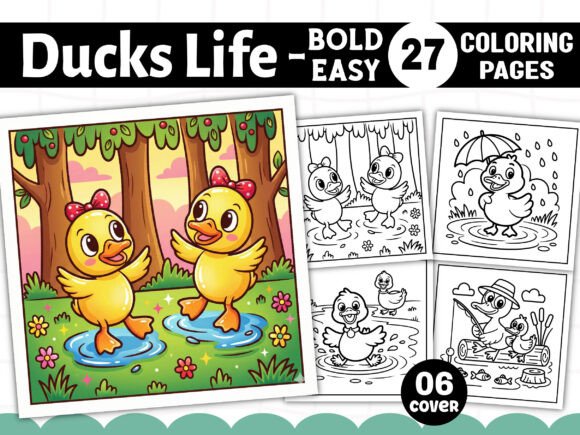
Before diving into mistakes, it is worth clarifying what you get. The interior download includes 27 unique designs in multiple formats: PDF, PNG, JPG, SVG, and EPS. The dimensions are 8.5” x 8.5” square, with high resolution at 300 DPI. All files are black and white, print-ready, and come with a free set of 06 PNG book cover files. The collection is designed for coloring enthusiasts of all skill levels, but the phrase "bold and easy" is a clue: these pages lean toward simpler, thicker lines that make coloring accessible and relaxing.
This is not a complex, intricate adult coloring book. It is meant to be approachable. That distinction matters because it affects how you market it and who you target.
Mistake #1: Ignoring the Square Format and Trim Size
One of the most overlooked details is the 8.5” x 8.5” square format. Many creators assume a standard 8.5” x 11” or 6” x 9” will work, but this product is designed specifically for a square trim. If you try to resize these files to fit a different aspect ratio, you will likely distort the artwork, crop out important elements, or create awkward margins. This can ruin the overall look of your interior and lead to customer complaints about poorly aligned pages.
The better approach is to embrace the square format. KDP supports 8.5” x 8.5” trim sizes, and square coloring books have a visually appealing, modern feel. Keep your bleed and margin settings consistent with this size. If you need to adjust anything, do so proportionally and always test print a sample first.
Mistake #2: Assuming All File Formats Are Interchangeable
Receiving 27 PNG, 27 JPG, 27 SVG, plus EPS and PDF files can feel overwhelming, but each format serves a different purpose. A common error is using the JPG files for editing and then wondering why the quality degrades. JPG is a compressed format and can introduce artifacts, especially if you re-save multiple times. PNG files maintain higher quality with transparency support, making them better for digital editing or combining with other elements.
The SVG and EPS files are vector formats. These are ideal if you need to scale the designs without losing resolution, or if you want to adjust line thickness, add color accents, or modify individual elements. However, many KDP publishers never need vectors if they are simply placing the pages into a PDF. The key is to pick the right format for your workflow. Use PNG for clean placement, SVG or EPS if you plan to edit, and always keep the original PDF as a print-ready master.
Mistake #3: Overlooking the Black and White Limitation
Because all designs are black and white, some creators mistakenly think they need to add color or background patterns to make the book more appealing. While this can work in some cases, it often backfires. Coloring book buyers expect clean line art on a white background. Adding colored backgrounds or extra shading can interfere with the coloring experience and make pages harder to use with colored pencils or markers.
Additionally, if you add color, you increase printing costs because KDP charges by page count and ink coverage. Stick with the original black-and-white format. If you want to differentiate your interior, consider adding a single test page or a brief instructions page, but keep the core pages pure line art. Your customers are buying this book to color, not to look at pre-colored designs.
Mistake #4: Neglecting the Cover Design Opportunity
The free 06 PNG book cover files are a nice bonus, but many creators treat them as an afterthought. They simply place one on the front cover without considering how it fits their overall branding or niche. A mismatch between cover style and interior style can confuse buyers and reduce click-through rates.
Instead, use the cover files as a starting point. Experiment with different compositions, add your title clearly, and ensure the cover image reflects the bold, easy, and duck-themed content inside. If you have design skills, you can also use the SVG or EPS files to create a custom cover that stands out. A professional-looking cover is your best marketing tool on Amazon, so invest time here.
Mistake #5: Forgetting to Check Bleed and Margin Settings
KDP requires specific bleed settings for print books. The standard bleed is 0.125 inches on each side. If you place the PNG or JPG files directly into a document without accounting for bleed, you risk having white edges or cropped artwork after trimming. This is one of the most common reasons for book rejections or customer returns.
When you import the files into your layout software (Canva, InDesign, Affinity, or even Word), make sure your document is set to 8.75” x 8.75” (adding 0.125” bleed on all sides) and that your artwork extends to the edge. Keep important design elements at least 0.25 inches away from the trim line to avoid them being cut off. The PDF file you received is print-ready, but if you are combining multiple files or adding your own pages, double-check every page for proper margins.
Mistake #6: Assuming One Interior Fits Every Audience
The Bold and Easy Ducks Life Coloring Book is described as ideal for all skill levels, but the "bold and easy" style particularly suits beginners, children, older adults, or anyone seeking a low-stress coloring experience. If you try to market this to experienced adult colorists who prefer highly detailed mandalas or intricate patterns, you may disappoint them. The lines are thicker, the shapes are simpler, and the duck theme is more playful.
The mistake is not adjusting your marketing to match the actual content. Be honest in your description. Use keywords like "simple," "relaxing," "beginner-friendly," and "cute duck designs." Include sample pages so buyers know exactly what to expect. This reduces returns and improves customer satisfaction.
Mistake #7: Not Testing Before Publishing
Even though the files are print-ready, it is still wise to test a few pages before uploading to KDP. Print them on your own printer, or use a local print shop to see how the lines appear on paper. Sometimes the 300 DPI resolution looks great on screen but prints slightly lighter or thinner than expected. Catching this early can save you from a batch of poor-quality books.
Also, test the cover mockup. Place your cover design on a 3D preview tool or use KDP's cover creator to ensure the spine and back cover align properly. A misaligned cover looks unprofessional and can hurt your credibility.
Mistake #8: Ignoring the Vector Formats for Customization
Many creators never open the SVG or EPS files because they think vector editing requires expensive software like Adobe Illustrator. However, free tools like Inkscape or even Canva (which supports SVG uploads) allow you to edit these files. If you want to add your own branding, adjust line thickness, or combine multiple duck designs into a single page, vectors give you the flexibility to do so without losing quality.
For example, you could take one of the duck SVG files, resize it, and create a title page or a "This Book Belongs To" page that matches the interior style. This small touch can make your book feel more cohesive and professional.
Mistake #9: Overcomplicating the Layout
Some creators try to add borders, page numbers, or decorative frames around each design. While this can look nice, it often distracts from the main artwork. For a coloring book, the focus should be on the line art. Extra elements can make pages feel cluttered or reduce the usable coloring area.
A cleaner approach is to center each design on the page with generous white space. If you want to add page numbers, keep them small and unobtrusive. Let the duck illustrations be the star. Your customers will appreciate the simplicity.
Mistake #10: Rushing the Upload Process
Finally, one of the biggest mistakes is rushing through KDP's upload and preview steps. After you compile your interior, upload the PDF and use KDP's online previewer to flip through every single page. Look for alignment issues, missing elements, or pages that appear blank. It is easy to miss a file that didn't import correctly.
Also, verify that your book cover files meet KDP's specifications for dimensions, resolution, and color space. A small error can delay your publication by days. Taking an extra 30 minutes to review everything carefully can save you hours of troubleshooting later.
Practical Checklist Before You Publish
To bring everything together, here is a quick checklist to run through before you hit publish:
- Confirm your trim size is 8.5” x 8.5” square
- Set bleed to 0.125 inches on all sides
- Keep important content at least 0.25 inches inside the trim line
- Use PNG or PDF for the interior, SVG or EPS if you need to edit
- Do not add color or background patterns to the line art pages
- Design a cover that matches the simple, playful duck theme
- Test print a few pages to check line quality
- Preview your entire book using KDP's online tool
- Use honest keywords like "beginner-friendly," "bold lines," and "easy coloring"
- Keep the layout clean and uncluttered
Final Thoughts
The Bold and Easy Ducks Life Coloring Book offers a solid foundation for a KDP interior that appeals to a wide audience. The key to success is not just having good files, but using them thoughtfully. Avoid the common mistakes outlined here, and you will save time, reduce frustration, and deliver a product that your customers will genuinely enjoy.
Remember that your readers are looking for a relaxing, creative experience. By keeping your design choices simple and your quality high, you give them exactly what they want: a charming collection of duck illustrations that are bold, easy, and fun to color.